⭐ Getting Started
FAQ
Find most frequently asked questions here.
September 29, 2026
Accounts
Can I have multiple accounts?
Yes, in settings > store you can add new team members. After invited, they receive a login link that should be clicked within 15 minutes. Please note, the multi-account feature is still in beta. Let us know if any questions come up!
How to add Circle-Hand to your home screen
Here is how you can add Circle-Hand to your home screen on iPads & iPhones:
Open Circle-Hand in Safari on your device
Click on the Share button
Click on ‘Add to home screen’
I get logged out from Circle-Hand too often
Your login should stay valid for more than 7 days per device. If that is not the case, most likely it is related to local settings on the device. On iPhones and iPads, Safari or the system can block or clear the login cookie. Since we cannot access your device directly, the best way is to rule out the most common settings that cause logouts:
(Remove the saved Circle-Hand app from your Home Screen first)
1. Turn off Private Browsing
Open Safari. If the address bar is dark and says “Private,” switch back to regular browsing.
2. Allow cookies
Settings → Safari → Advanced → Block All Cookies → make sure this is off.
3. Try with Prevent Cross-Site Tracking off
Settings → Safari → turn off “Prevent Cross-Site Tracking” temporarily.
4. Disable content blockers
Also make sure you open Circle Hand directly in Safari, not with the saved app on your Home Screen while testing.
5. Turn off iCloud Private Relay
Settings → Your Name → iCloud → Private Relay → turn off.
How secure is Circle-Hand? What are your security measurements?
You store highly sensitive client information in Circle-Hand, which is why security and data privacy are very important to us.
Circle-Hand is based in Europe with servers hosted in Frankfurt, Germany and fulfills GDPR, which is the strictest data privacy regulation in the world. Circle-Hand is also an official Shopify Partner, which requires meeting Shopify's additional data protection standards on top of GDPR.
Data is encrypted at rest (AES) and in transit (TLS 1.2/1.3). Every access to client data is logged, access is managed through role-based access control (RBAC) and sessions automatically time out after inactivity. Circle-Hand does not expose API endpoints to third parties beyond what is required to operate (Shopify, PayPal POS, Square). We do not share your data with marketing services. Our revenue comes only from subscriptions.
The login is managed through 2-step login links and login codes, as stolen credentials are consistently ranked as the primary way hackers gain access to systems.
From a security point of view, it is always best to keep the complexity of a system to a minimum, as each system boundary represents an attack surface where leaks could happen. This is why many stores are using Circle-Hand to manage all their consignment workflows, from item intake and applications to payouts.
That said, no software is 100% safe. The highest remaining risk is human e.g. leaving Circle-Hand open in-store without logging out from the device.
More details can be found in our privacy policy and terms and conditions.
Client Portal
Can clients print their own labels from the client portal?
Yes, you can activate this option in settings > client portal.
That being said, most stores end up printing the labels for clients to ensure a consistent look in the store or avoid barcodes that cannot be scanned at checkout. Some stores also apply a surcharge of 10 cents per label, you can set this in settings > store > default surcharge.
Can clients delete items from the client portal?
If you activate settings > client portal > clients can edit items, clients can set the quantity to 0 to indicate a delete. We had this feature in the past and it led to confusion, e.g. clients deleted items by accident and they no longer showed in the POS checkout.
Items & barcodes
How much is the background removal feature? Why is it not free?
After the first 50 images, you see an option to buy more credits when uploading a new image.
We added the background removal feature because many shops were already using PhotoRoom separately, so we integrated it directly into Circle-Hand. The usage turned out to be much higher than expected which is great! As we partner with PhotoRoom the price per image is the same as PhotoRoom’s API cost (1000 images for 20$). We tested several cheaper alternatives, but PhotoRoom delivered the best results. We are also working on a free model.
How to process a refund?
You process the refund via your POS (PayPal / Zettle, Shopify or Square), this will automatically sync back to Circle-Hand.
For Shopify, make sure to activate “Restock item” if processing a refund:

For Zettle / PayPal POS, make sure that either:
You have a return period e.g. 7 days set up in Circle-Hand Settings > Store, or
Circle-Hand settings > Zettle that automatically deletes sold items is deactivated.
If there’s no return period and the items are deleted automatically after being sold, then Zettle won’t be able to process refunds for those items since they no longer exist.
Can I use a different start number for the barcodes?
Yes, you can set up barcodes with 8 digits or more. Here is how you can do it:
Go to Settings > Store > Tools
Deactivate Automatic Barcode Generation
Manually create a new item with a barcode like 10000000 and save it
Reactivate Automatic Barcode Generation
From then on, new items will automatically receive the next number, e.g. 10000001, 10000002, and so on
Can I use letters in barcodes?
Circle-Hand only allows numbers for the barcode. You can add letters and numbers in the SKU field (settings > attributes > barcodes). We would still recommend to use automatic barcodes from Circle-Hand as many platforms like Google Shopping require numeric barcodes, and they scan better on small labels.
When I click ‘Create PDF’ it doesn’t open
Make sure to deactivate all pop up blockers in your browser settings, e.g. on Apple device:
Go to Settings > Apps > Safari
Turn Block Pop-ups on or off
Can I use a barcode scanner with Circle-Hand?
If you prefer a faster method to identify items in your inventory, consider using a barcode scanner. It functions similarly to a keyboard: simply plug the scanner into your computer, select the search field with your mouse, and start scanning. A popular choice among our customers is the Inateck BCST-43 1D Bluetooth Barcode Scanner. You can find more details and a demonstration video on their product page.
Delivery & payout receipts
Can I customize the receipts?
Yes, you can customize the receipts under Settings > Receipts and add your terms and conditions. Stores on the professional plan can add their logos. Currently, you cannot change the language or table headers of the receipts, but most people read the email instead of opening the PDF, which is why you can fully customize the email.
Can I fully automate the payouts?
Circle-Hand does not process payouts automatically (yet). Before processing payouts, you can create an export and upload that file to your bank, PayPal or Venmo to run a mass transfer by selecting the clients > manage clients > export csv - The advantage of this is that the export/import has no additional fees. We are also working on full payout automation: https://www.circle-hand.com/roadmap
How can I deduct a monthly or weekly rent?
You have two options
(1) Somes stores charge the rent upfront, e.g. by using Square Invoicing, to improve cash flow and avoid situations where the payout does not cover the rent.
(2) You can the client profile > add fees per month, per week, per payout and so on.
Square POS & Zettle POS
Can I use Square Online with Circle-Hand?
If your goal is to have an online shop, we definitely recommend Shopify. You can still use Square POS in-store and Shopify for online sales. Many stores have tried Squarespace, WooCommerce or others, but all of them switched to Shopify because it offers far better integrations and real-time syncing between online and in-store inventory.
Circle-Hand also integrates fully with Shopify, not just for online sales but also for features like returns, discounts, and detailed reporting. If you use Square as the connector for online, we can’t guarantee that sales data flows cleanly back through Square into Circle-Hand, leading to incorrect data etc., which is why Shopify is the more reliable option long-term (even if you didn’t use Circle-Hand we would recommend Shopify for online).
Hope this helps in your decision making. Let us know if any other questions come up!
How to sync Store Credits to Square or Zettle?
If you process a payout in Circle-Hand, select Store Credit as the payout option.
If you then open the client profile, you will always see the store credit balance and can adjust it there.
Square doesn’t support store credits yet. We already sync store credits with Shopify. As soon as Square releases store credits as an option, we will also be able to sync it directly. So for now, store credits are managed in Circle-Hand. When a customer pays with store credit, you select ‘Others’ in the Square checkout and deduct the store credit in Circle-Hand.
Can I use Square POS and Shopify for Online?
Yes, you can use Square POS in-store and Shopify for online sales.
Can I use the Circle-Hand POS? Why should I use Shopify, Square or PayPal POS?
Shopify, Square and PayPal have thousands of employees working on their POS every day. Because of that they have unlimited features and cover everything a consignment store needs at the checkout: loyalty programs, receipt printing, returns, end-of-day cash counts, taxes by category, gift cards, store credit (also used for online sales), offline mode, adding custom payment methods. Building all of that ourselves would never reach the same quality and would distract us from what we do best: fast intake, consignment and buy outright workflows, payouts etc. Everything syncs in real-time.
All modern POS apps (Shopify, Square, PayPal Zettle, SumUp) are built mobile-first nowadays. An iPad with a card reader runs $200–400; a Windows tower with monitor, cash drawer and receipt printer is $1,000+ and ages out faster + has more security risks. The iPad's built-in camera scans barcodes and photographs items at intake, no extra scanner or camera needed. Apps update themselves, no IT visit. Staff carry the register onto the floor for a sale, into the back room for intake or to the racks to check a price. Adding a second register on a busy Saturday or doing Pop-Ups is just another iPad.
Email updates
Can I change the sender email address or domain?
Your store name will show up as sender name. At the moment it's not possible to change the sender email of notifications@circle-hand.com - we've put a lot of work into warming the email and with thousands of emails sent every day using this email it's the best way to ensure that your clients actually receive the email and it doesn't go to spam (right now the delivery rate is >98%). It's also quite a technical effort to set up your DNS domain, unsubscribe preferences etc. However, this is on our roadmap for future updates. Most shops include their own email address in the body of the email (settings → emails) so that your clients can simply reply by clicking on your email address.
My clients don’t receive emails
We take a lot of measurements behind the scenes to achieve a high delivery rate (currently >98%) and sending thousands of email per day. Sometimes clients still don't receive emails, most likely because:
(1) They have unsubscribed → They can re-subscribe by clicking on preferences in one of your email updates.
(2) The email is declared as spam → Add notifications@circle-hand.com to their contacts.
If it still doesn't work, please send us their email address and we'll look into it.
(Outlook, Hotmail) Sellers are unable to sign in / see link is expired
In most cases, this happens when
Clients click an old login link.
With Microsoft Outlook accounts (live.com / outlook.com / hotmail.com)—they have a Safelink feature that clicks on all links in emails before they are delivered. You can ask them to disable this feature by going to the settings in Microsoft. Here is how to do it.
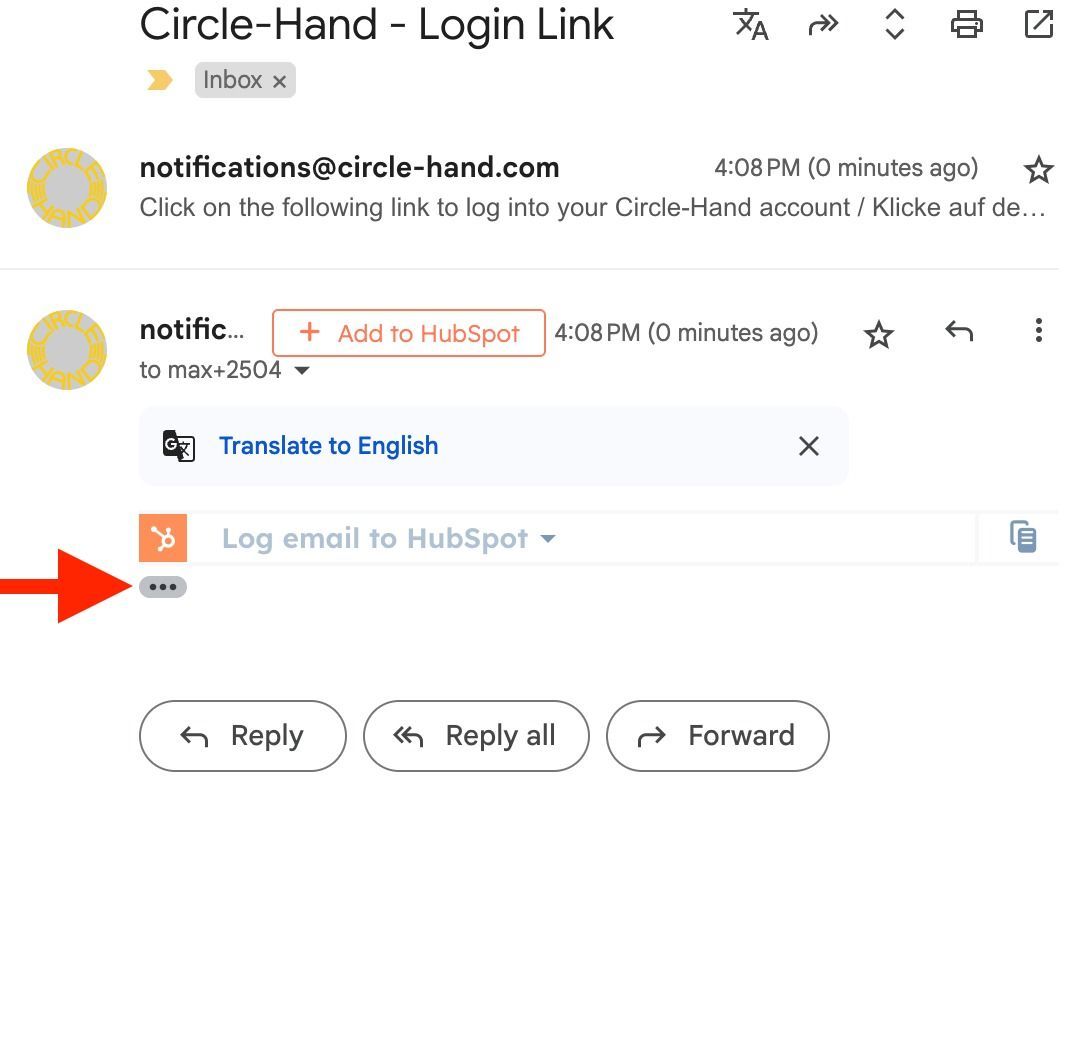
With Gmail, it usually happens because clients click on a previous email. Gmail groups emails together, and when they click the three dots, they can access the most recent login email.
If it still doesn't work, please send us their email address and we will look into it!
(Gmail) Sellers are unable to sign in / see link is expired
Gmail sometimes summarizes the login emails. Here is how you can get to your client profile:
1. Open the client portal link.
2. Enter your client portal email (it must be different from your store account email).
3. In Gmail, open the latest login email and click on the three dots to expand it.
4. Enter the latest code or click the link to login.
Does Circle-Hand offer custom branding for emails and the client portal?
Yes, In the Professional Plan you can include your logo in the client portal and on your receipts. Let us know and we can set it up for you!
The sender name for all emails is your store name, the sender email is notifications@circle-hand.com. Circle-Hand sends thousands of emails each day and take many measurements to ensures a delivery rate > 98%, clients would need to click on the sender name to view the email address.
Discounts
How can I select who covers the discount: store only vs store & client?
You have 2 options:
(1) You activate in settings > store > attributes ‘Discount Covered By’, then you can select per item in Circle-Hand who covers the discount, you as store or you share it with your client. You can also set a default under settings > store > default.


(2) When selling items via the Shopify POS or Zettle. Make sure to give the discount on item level and not on the full basket.
Any other questions? Write us: max@circle-hand.com