📥 Import your data
Import from other systems
Many shops use the import as chance to clean up their data. Circle-Hand works best with high quality data input - that's why most stores only import in-stock items.
September 29, 2026
Go to settings > Data > Click “Consignors” and “Inventory” and select status = active
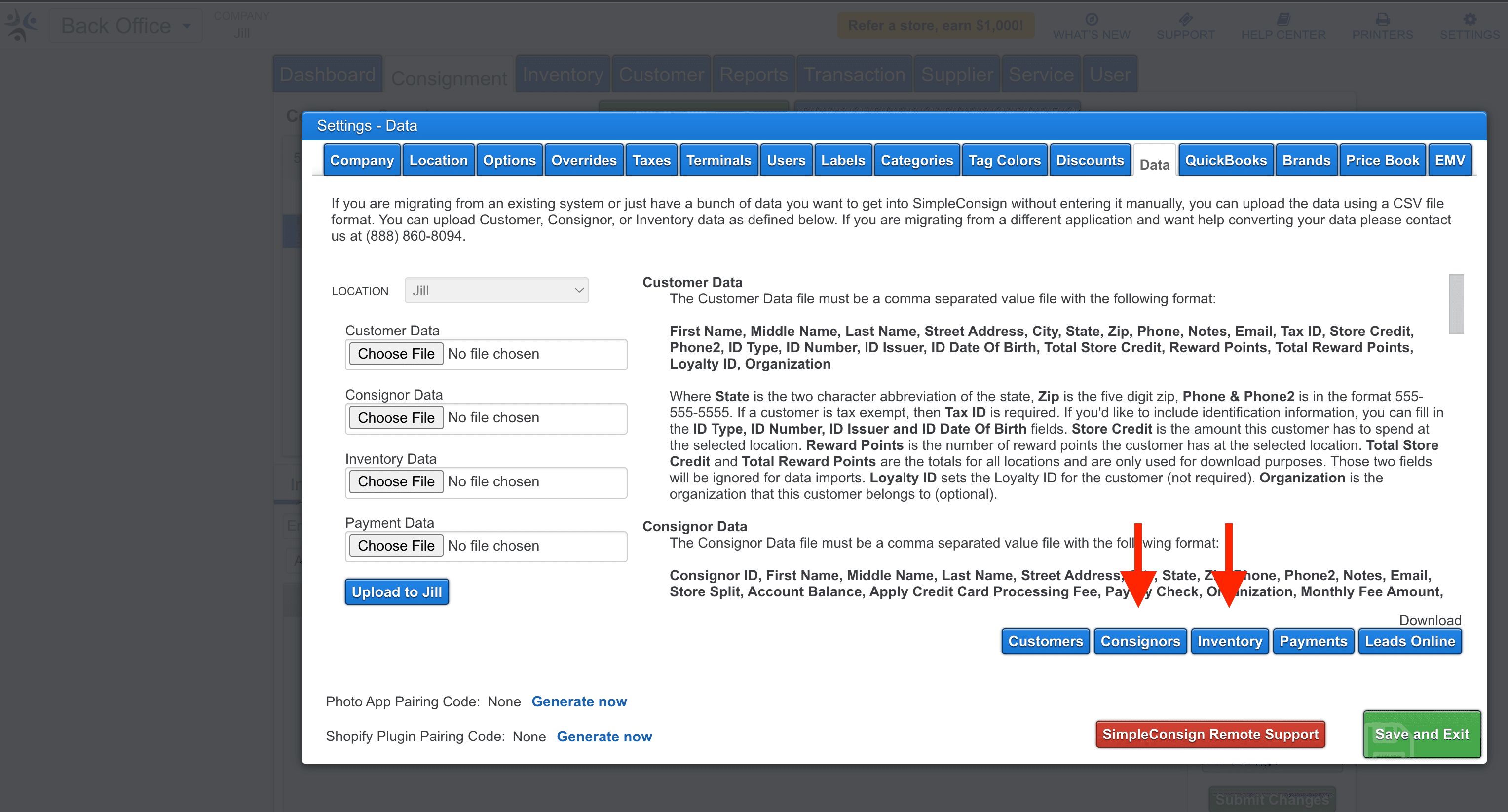
You click on ‘Inventory’ and ‘Accounts’ and create an export from there. Then you can upload the files directly into Circle-Hand using the Import Wizard.

Click on Accounts > More > Export to export all consignors
Click on Products > More > Export to export all your items


The process is super straightforward. You just need to send us the database file from ConsignPro, which you’ll find in your folder, the MDB File:

Once you have the file you can share it via a platform of your choice (e.g. Google Drive) or whichever works best for you. We will send you the CSV files for clients and items that you can then upload directly in Circle-Hand. Feel free to reach out if you have any questions!
As the transition of the file takes some manual work from our team, the import service is only available in the yearly plan.
You can create a backup following this instruction. Make sure to take note of the location where you create the backup. After that you could create a CSV via a converter like this (.bak to .csv) and upload the data to Circle-Hand. Feel free to reach out if you have any questions!

Any other questions? Write us: max@circle-hand.com